I gave my home server a voice. Not text-to-speech: an actual singing voice that takes lyrics and a style description and performs a full song, with the backing track, in about 15 seconds.
The goal was a pipeline I could run entirely on my own hardware. No cloud subscription, no vendor lock-in, no uploading anything, and control over every parameter the model exposes.
The model is ACE-Step 1.5, an open-source music generation model. I run it through acestep.cpp, a ggml port of it, on my home GPU server compute01: two NVIDIA Tesla P40s with 24 GB each. They’re old Pascal datacenter cards with lots of VRAM and no usable FP16, which shapes most of what follows.
The Architecture
A song is two engine runs. ace-lm, a 1.7B language model (Q8), reads the caption and lyrics and writes the song’s metadata and audio codes. ace-synth, the turbo diffusion model (Q8) plus a BF16 VAE, renders those codes to audio. Both run as per-request subprocesses on one P40 and release the card when they finish, so nothing sits in VRAM between songs. A 60-second song with lyrics takes 15 to 16 seconds.
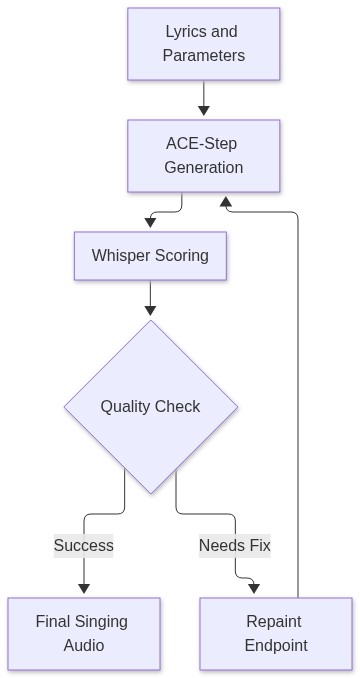
Around the engine sits a Gradio portal and an MCP server (music-scout) so my agents can request songs. On top of that I added three things: batch takes, automatic Whisper scoring of each take, and a repaint endpoint for fixing one section of a song.
Hear It
Two songs straight out of the pipeline, unedited. I wrote the lyrics and a one-line style description; everything else (melody, arrangement, the singer, the mix) is ACE-Step. Each is the best of three takes, picked with the Whisper scoring described below.
Engineering the Pipeline: The Real Challenges
1. Songs over a minute silently failed
I also run a Gemma 26B language model on the same cards, and it takes about 11 GB per card. That leaves roughly 7.5 GB free. Songs up to 60 seconds worked; at 75 to 90 seconds they produced nothing.
There were two causes. First, my own VRAM gate demanded 8.5 GB free before starting a song, so it could never pass with Gemma loaded. Second, the VAE decodes audio in tiles, and the default tile is 1024 latent frames, about 41 seconds of audio, needing a contiguous buffer of about 6.7 GB. That doesn’t fit in 7.5 GB. Worse, ace-synth exits with code 0 after a failed decode, so the failure looked like success with a missing file.
The fix was --vae-chunk 256: about 10 seconds per tile and about 1.7 GB per tile buffer. With that, the gate came down to 6 GB. With Gemma still loaded, a 90-second song with lyrics now renders in 34.5 seconds, and Whisper hears 96% of the lyrics.
2. Scoring takes with Whisper
ACE-Step’s output varies a lot between seeds. Some takes start late, some mumble, and some never sing at all. So the portal renders 1 to 4 takes in a single GPU batch: one ace-lm run writes all of them and one ace-synth run renders them, so extra takes cost little extra time. Peak VRAM was 3.99, 5.78 and 7.44 GB for 1, 2 and 3 takes.
Each take is transcribed by the local Whisper server and scored on three things: when the vocals start, what fraction of the lyric words were sung in order, and whether there are real vocals at all (fewer than 3 heard words counts as none, because Whisper hallucinates a word or two on pure music). Takes come back sorted best first.
The first version scored nearly every good take at zero. The cause was section tags: lyrics contain markers like [Verse 1 - battle rap], and the scorer counted “verse” as the first word to find. It never appears in the transcript, so the in-order match failed on the very first word. Stripping every bracketed tag fixed it. Two smaller details mattered too: folding accents so “cautín” matches “cautin”, and building words from Whisper’s segment text, because whisper.cpp splits sung words into fragments.
3. The repaint endpoint
Regenerating a whole song because one line came out garbled wastes time and throws away a good take. Repaint regenerates just one time window.
It runs ace-synth alone with task_type: repaint and --src-audio. The engine VAE-encodes the source, masks the chosen window in the diffusion model’s context, regenerates it, and splices the original audio back outside the window. I tested a 60-second song with seconds 20 to 30 repainted: outside the window the difference from the source matched a plain re-encode, so it was untouched. A 180-second source repainted in 55 seconds, which used to run out of memory.
One gotcha: the engine’s own MP3 writer shifts the audio by its encoder delay, 1057 samples or 22 ms, which breaks a sample-level comparison with the source. Writing WAV and encoding with ffmpeg lines the output up exactly.
Full Parameter Control
The original portal only passed caption, lyrics, duration, seed and language, so the language model guessed the tempo and key. The API now passes eight more settings through the whole chain (a value of 0 or blank means the engine default):
- bpm: tempo.
- keyscale: key and scale, e.g. “D minor”.
- timesignature: e.g. “4/4”.
- inference_steps: diffusion steps (turbo default 8).
- shift: the diffusion timestep-schedule shift (turbo default 3.0).
- lm_temperature: randomness of the language model (default 0.85).
- lm_cfg_scale: the language model’s classifier-free guidance (default 2.0).
- takes: 1 to 4 takes per request, scored and sorted best first.
Old callers that send only the original 7 inputs still work: the endpoint fills the rest with defaults.
Example Usage
From Python on the server:
# Three takes of a 60 s song at 90 BPM in D minor, best take first
best_mp3, info = generate_song(
    caption="gritty boom-bap battle rap, dark piano loop, vocals from the first second",
    lyrics=open("lyrics.txt").read(),
    duration=60,
    bpm=90,
    keyscale="D minor",
    takes=3,
)

# Re-render seconds 20-30 of an existing song; caption and lyrics come from its sidecar
mp3, info = repaint_song(src="20261104-070750-battle-rap-take2.mp3", start_s=20, end_s=30)
What I Learned
Most of the work wasn’t the model. It was the plumbing around it: a VRAM gate that matched reality, a decoder that failed silently, a scorer tripped up by a section label, and an MP3 writer that shifted audio by 22 ms. None of that shows up in a model card, and all of it decided whether the pipeline worked.
Pronunciation is the remaining weak spot, and it’s mostly solved with spelling. Acronyms need to be written out: “IIoT” came out as “EOT” until I wrote “eye eye oh tee”, and “MQTT” became “member T” until it was “em cue tee tee”. “SCADA” still comes out as “scatter” or “skydive”.
What’s Next?
- Voice swap: already working. The server can re-sing any of these songs in another voice with Seed-VC. That’s the next post.
- Remix and cover: ACE-Step can restyle an existing song, which the portal doesn’t expose yet.
- Bigger models: test the SFT and XL diffusion models on Pascal, and LoRA fine-tuning on songs I like.
For now, compute01 is singing.