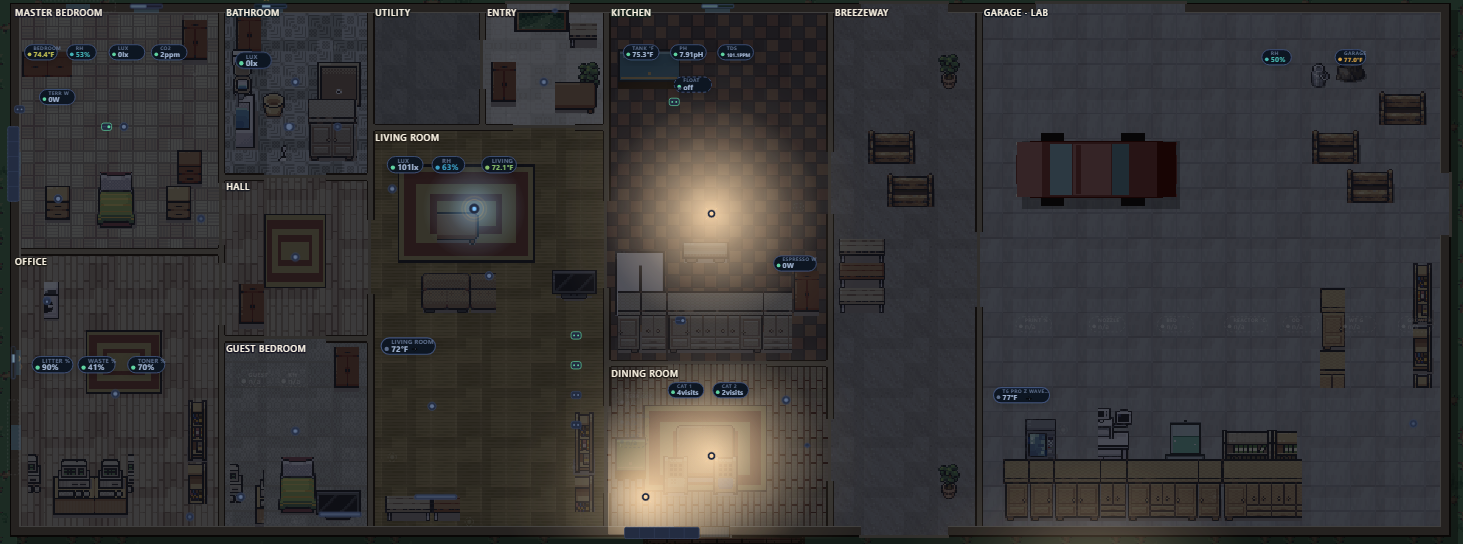
I wanted to look at one screen and know which lights were on, what the garage lab was doing, and whether it was raining on the duck coop. My Home Assistant install has about 1,900 active entities across 441 devices and 14 areas. I could get at any of it from a list, but I couldn’t see the house.
There’s a corner of the HA community that builds dashboards that look like a top-down Pokémon town: a pixel-art house where the lamps actually glow when you turn them on. That was the target, a live view of the house as a little game map.

The floor plan came from the vacuum
A dashboard like this is only as good as its floor plan, and I didn’t have one. Home Assistant knew the house had a kitchen, an office and a hall, but not where they were: no floors defined, no coordinates. The first version of the map was a plausible layout invented from the room names. It looked fine. It was wrong.
The fix had been sitting in the dining room the whole time. My Roborock drives lidar around every room each time it cleans, and its map is the most accurate floor plan of the house that exists. The Roborock integration exposes that map as an image entity.
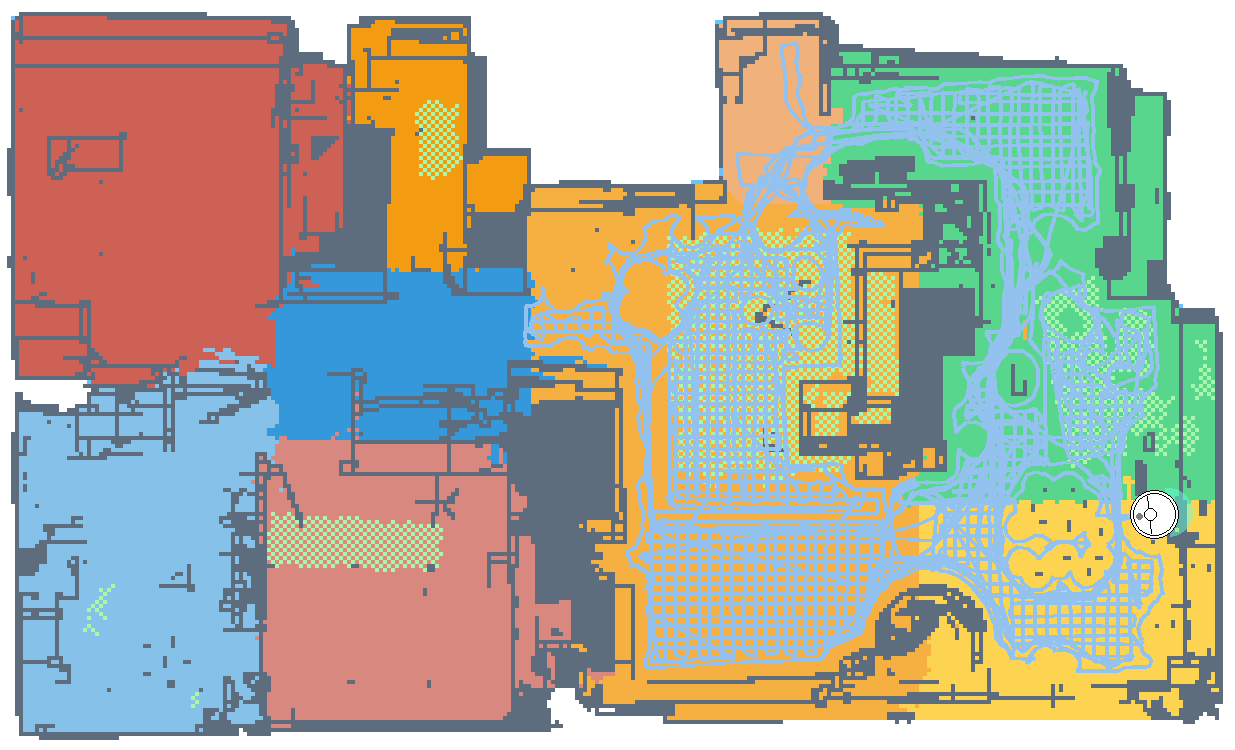
The hard part is tying the vacuum’s room names to its pixels. The map is a flat picture with no labels on the regions. The trick is that the integration draws it with a fixed color palette keyed by segment number: segment 1 is always the same peach, segment 7 always that green, segment 9 always that yellow. That table lives in the map-parser library the integration uses (vacuum-map-parser-base), so it could change in a future version, but today “Dining room” → segment 9 → yellow → this region of pixels is a lookup.
If you want to try it, here’s the recipe:
- Save the map image from the vacuum’s
imageentity. - Call the
roborock.get_mapsaction to get each segment’s id and name. - Look up each id’s color in the palette and collect the pixels of that color.
- Assign the leftover pixels (walls, carpet, cleaning paths) to the nearest segment, so each room becomes a full floor footprint instead of a patchy fill.
- Set the scale from one wall you can measure. Here the house’s known depth works out to 80 pixels per metre.
- Sanity-check the result. The traced rooms total about 1,320 sq ft of vacuumed floor against 1,450 sq ft of living area, and the shortfall is closets and space under furniture.
To check the mapping, the vacuum reported it was docked in the Dining Room, and the dock icon sits inside the yellow region. Nine rooms went from the lidar bitmap into the dashboard’s model this way, carrying the names from the Roborock app.
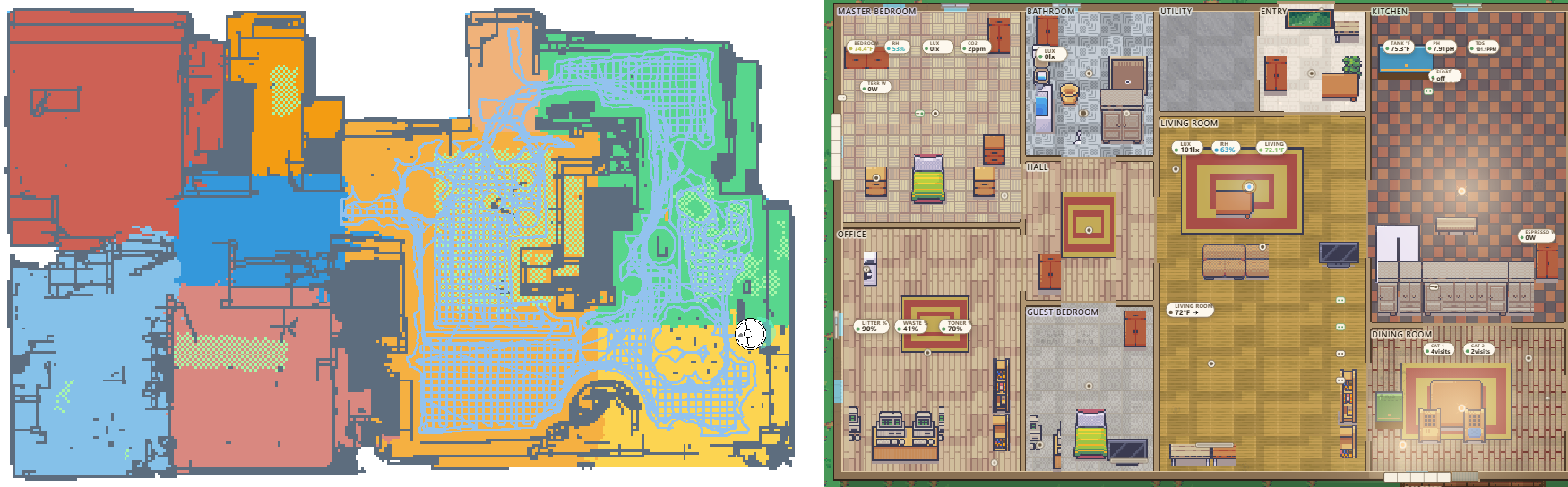
Three gotchas worth passing on:
- Renaming rooms in the Roborock app doesn’t reach HA right away. Until I renamed them, most of the vacuum’s rooms were just called “Bedroom”, and that’s where the first wrong layout got its names. After the rename, HA kept serving the old map and old names for hours, and every normal refresh returned the stale copy, including the
roborock.get_mapsaction andhomeassistant.update_entity. In my case nothing short of reloading the Roborock config entry pulled the new map. - Renaming doesn’t move walls. Diffing the before and after maps showed only the dock icon and cleaning paths had changed. The geometry was right all along; the earlier model had just attached the names to the wrong rooms.
- Check the orientation with your own eyes. One version was traced perfectly and drawn mirrored top to bottom. Every wall was right relative to every other wall, and the whole house was upside down. I spotted it as soon as I looked, and the automated checks didn’t catch it.
How it’s built: pixel art as a skin, lighting drawn live
The usual community recipe is to paint the floor plan in a tile editor, then hand-cut a “lit” overlay image for every single light and fade each one in when the light turns on. It looks great, but I have 31 lights and 152 entities I wanted on the map, and every new lamp would mean another overlay. So I did it differently:
- One model file describes the rooms, the furniture and where each entity sits.
- A bake script (run once, like baking lighting in a game engine) turns that model into a single pixel-art image. If I move a wall, I re-run it.
- A renderer draws everything live on top. At night it dims the base image, and each lit lamp adds a radial glow tinted by the bulb’s actual color and scaled by its brightness. Motion sensors pulse, doors swing, and the weather entity drives rain, snow or fog over the yard. Day and night follow the real sun.
- Adding a device is one line in the model, with no new art.
The renderer doesn’t know anything about Home Assistant. It takes a model and a list of states. A small wrapper makes it a Lovelace custom card, and a different wrapper can feed it a snapshot file for a web page.
For the art I didn’t use actual Pokémon tiles. Those are Nintendo’s and not licensed for this. It’s LimeZu’s Modern Interiors and Modern Farm packs, which are cheap, licensed for commercial use, and very much in the same spirit. The cars, the Pioreactor (a small open-source bioreactor) and the aquarium tanks aren’t in either pack, so the bake script draws them pixel by pixel, and it shows.
The dashboard that only broke in a background tab
If a restored HA tab comes up blank, click on it.
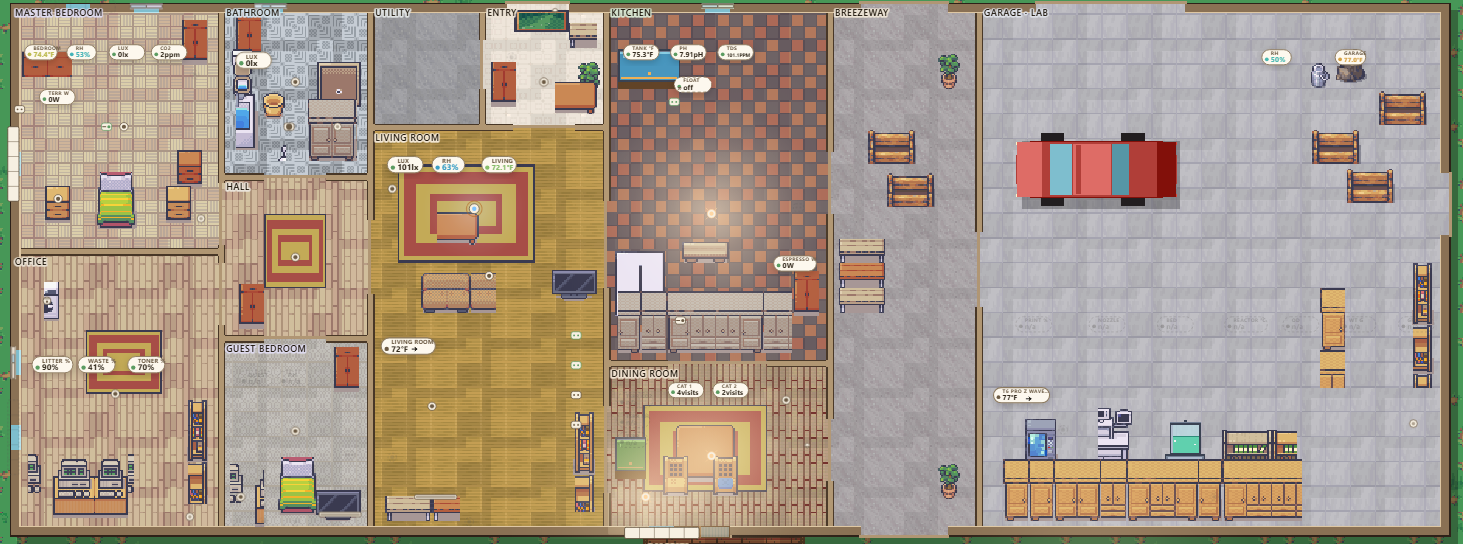
During testing the dashboard sometimes loaded completely blank, with no errors. All twelve Lovelace resources were swapped for empty stubs and it was still blank. Home Assistant builds the dashboard view inside a requestAnimationFrame callback (the browser’s “run this before the next frame” hook), and browsers pause those in hidden tabs. The testing ran in an automated browser that kept the tab in the background, so the view never got built. In a normal, visible tab it works fine. That’s standard browser behavior.
Where it stands
It’s live in Home Assistant, with all 152 entities on the map and all 31 light glows checked to land inside their own rooms on the pixel art. Rough edges I know about:
- Furniture is placed by footprint, not by eye. The beds look small, and the kitchen floor is a very loud checkerboard.
- HA caches
/local/files for 31 days, so re-baking the image under the same URL leaves old art under new walls. Give the image a new URL on every re-bake, for example by settingpixel_base: /local/floorplan-twin/pixel-base.png?v=4in the card config. I haven’t applied that fix on my own dashboard yet.
The public version of the map isn’t built yet, and privacy is the reason it needs care. A live map that shows motion, open doors and who’s home also tells anyone reading it when the house is empty. So when it goes up here, it’ll be push-only from the house, with lights, temperatures and lab gauges live and doors, motion, cameras and presence left out. The pictures in this post are rendered the same way.
Meanwhile the vacuum keeps mapping. If I ever move a wall, it’ll know before Home Assistant does.
Tiles: LimeZu (limezu.itch.io).