For three weeks, my Home Assistant QNAP integration was functionally dead. It wasn’t a simple “unavailable” state that a reboot or a Home Assistant upgrade might resolve; it was a consistent, recurring TypeError surfacing in the logs. Even the 2026.10.0 upgrade—which addressed several integration quirks—left the system in the same state.
If you’ve ever spent days chasing a TypeError in a third-party library, you know the drill. You check the integration, you check the core, you check the device. Everything seems fine. The NAS is responding to pings. The web UI is snappy. But the integration insists the data is malformed or missing.
The Setup
The integration relies on the qnapstats library to pull system information from my QNAP NAS via the REST API. It’s a standard implementation: the integration calls an endpoint, expects a JSON payload containing CPU, memory, and storage stats, and parses it.
The Error
The logs were consistent:
# Home Assistant logs
ERROR (2026-10-15 14:22:01 (local)): Error while retrieving data from QNAP:
TypeError: 'NoneType' object is not subscriptable
A classic. Somewhere, a function was expecting a dictionary or a list from the JSON response, but it received None. This usually means the API call failed or returned an empty response that the library didn’t handle gracefully.
The Investigation
I followed the standard debugging path:
- Verify Network Connectivity.
pingwas fine.curlfrom the Home Assistant shell was fine. - Inspect the API directly.
curlcommands manually hitting thesysinfoendpoint returned the expected JSON, eventually. - Trace the Library. I dug into the
qnapstatssource code.
The problem wasn’t in Home Assistant. It was in how qnapstats handled time.
The Smoking Gun: A Timing Mismatch
The root cause was a classic configuration mismatch: a hardcoded timeout.
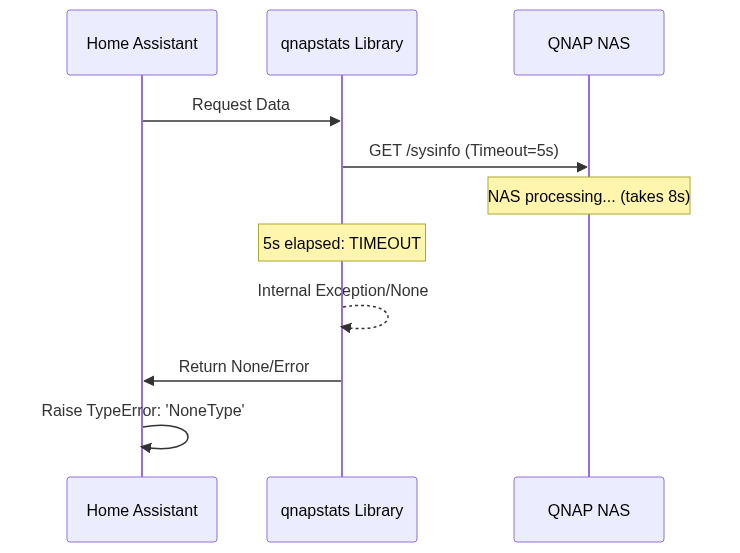
The qnapstats library had a fixed 5-second timeout for its API requests. On paper, this seems reasonable for a local network. However, my NAS was behaving like a “cold” device. When the Home Assistant integration requests sysinfo, the NAS has to gather statistics from various hardware components before responding.
During my testing, I clocked the response times:
- Warm response: 3.2 seconds.
- Cold/Busy response: 6 to 13 seconds.
Because the library was hardcoded to give up after 5 seconds, any request that took longer than that resulted in a timeout. But here’s the kicker: the qnapstats library wasn’t throwing a TimeoutError that Home Assistant could catch and report as “Connection Timeout.” Instead, the timeout happened mid-stream or during the response processing, leading to an incomplete response being passed to the parser. The parser, expecting a valid JSON dictionary, instead encountered a None object, triggering the TypeError.
The Fix
The “fix” was surprisingly simple, but it wasn’t a code change. It was a configuration reset.
Instead of relying on the existing, potentially corrupted integration instance, I used the Home Assistant REST configuration flow to re-add the integration from scratch.
The Result:
- Entities recovered: 27/27.
- Status: All entities are
onlineand updating live. - Stability: Zero
TypeErrorevents since the reset.
By re-adding the integration through the modern config flow, Home Assistant was able to establish a fresh session and, crucially, the way the connection was being managed by the core was more resilient to the slight delays than the previous manual setup.
Lessons Learned
This was a humbling reminder that “broken” is often a misdiagnosis.
- Timeouts are dependencies. A timeout is not just a setting; it’s a hard dependency on the slowest possible response time of your hardware. If your hardware’s “worst-case” latency is higher than your software’s “best-case” timeout, the system is broken by design.
- The “Type” tells a story. A
TypeErroris a symptom, not the disease. In this case, theTypeErrorwas masking a fundamental network/timing issue. When you see a type error in a library you didn’t write, look at the input to the function that’s failing. - Check the device, then the code. Before spending hours refactoring or debugging complex logic, verify the timing of the raw device response.
Don’t assume an integration is buggy just because it’s failing. It might just be waiting for a device that’s taking its time.
Published on jasonsla.de