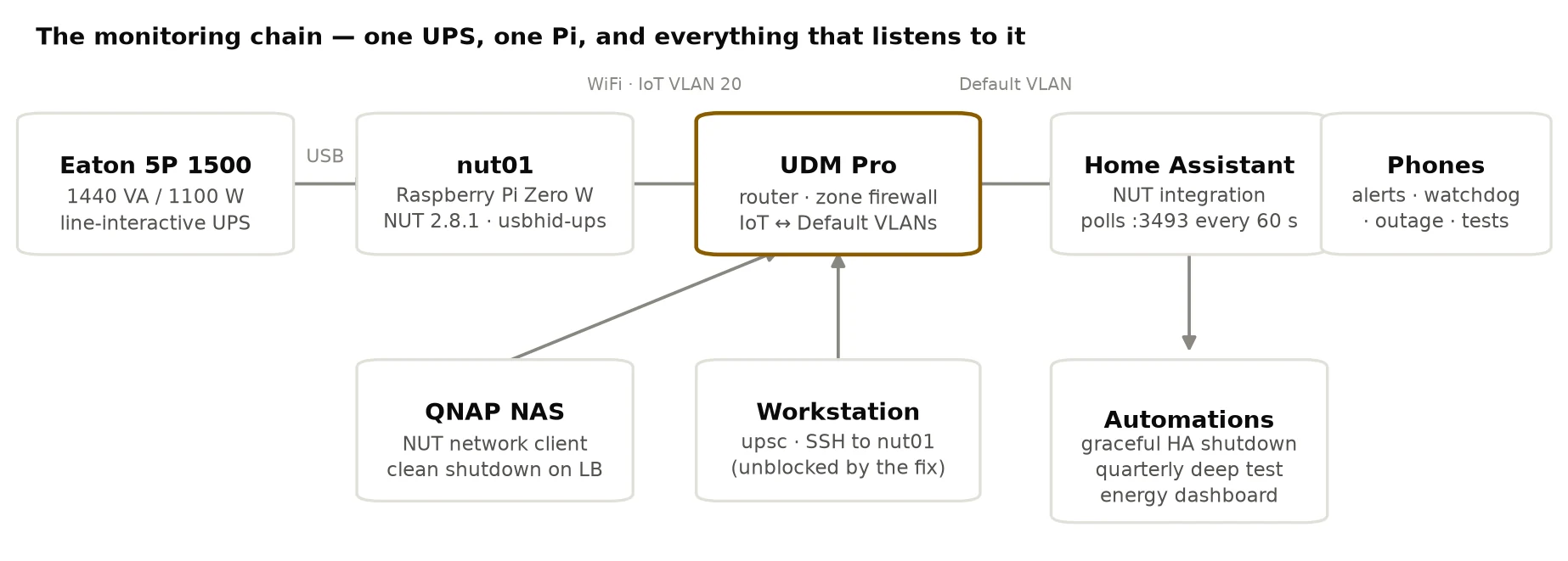
A UPS is insurance you hope never pays out, and monitoring it is insurance on the insurance. Mine looked responsible on paper: an Eaton 5P 1500 feeding the network core, a Raspberry Pi Zero W named nut01 speaking Network UPS Tools to it over USB, and Home Assistant polling the Pi every sixty seconds, charting battery, load and line voltage. Alerts wired to phones. Nine months of hourly history in the recorder.
Then I actually audited it — pointed Claude at nine months of accumulated telemetry and asked what it said. The answer was uncomfortable in a way I didn’t expect. The power data was fine. The monitoring was the thing that kept failing, and nothing in the house was built to notice.
A third of the year, missing
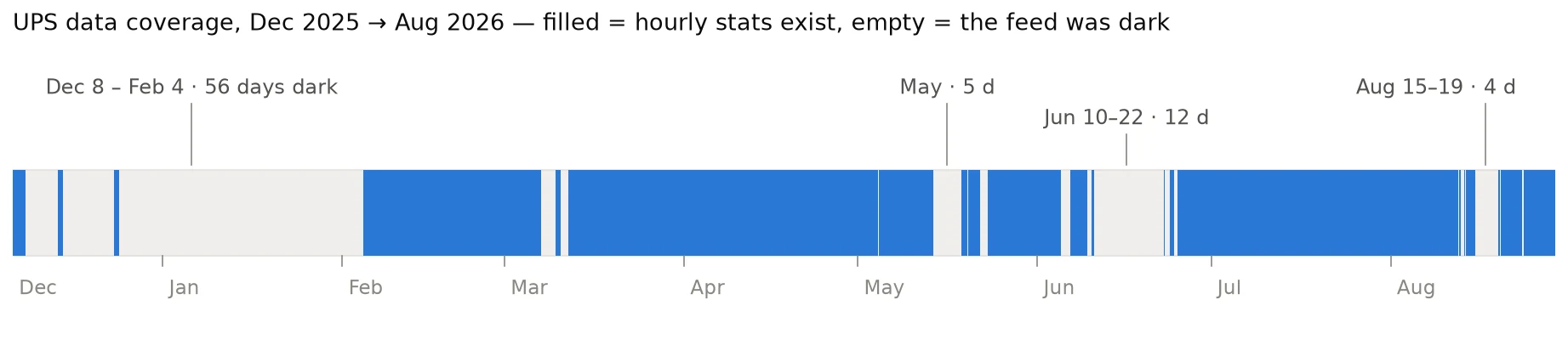
Home Assistant keeps hourly statistics forever for numeric sensors, so the audit had 4,268 monitored hours to work with. It also had 2,124 hours of nothing: twenty-six gaps where the UPS feed simply stopped, including fifty-six days across December and January, twelve days in June, and four days in mid-August. A third of the last nine months of UPS history does not exist.

The gaps weren’t Home Assistant dying — other sensors kept recording straight through them. The UPS feed specifically went dark, for days at a time, and no automation fired because the automations watched UPS states. A dead feed has no state. The sensors quietly read unavailable, the dashboard tiles went grey, and life went on.
That’s the general failure mode worth internalising: a monitor that fails dark is worse than no monitor, because you believe it. If the power had gone out during those ninety-odd days, the UPS would have carried the load silently until the battery emptied, and the first notification would have been the house going quiet.
The detour: a firewall that only let the popular kid through
To dig into the Pi I needed SSH to it, and SSH didn’t work. Neither did ping, nor the NUT port — from my desk, the entire IoT VLAN was unreachable, even though the network documentation said main-network hosts could reach into it, and even though Home Assistant plainly was reaching into it every minute.
The culprit was rule ordering in the UniFi zone firewall. A custom “block IoT to internal” rule matched all connection states and sat above the system’s return-traffic allow. Outbound packets from any main-network host entered the IoT VLAN fine — the allow rule for that direction had four million hits — but the replies died on the way back. Except replies to Home Assistant, which matched its own allow rule first. The one host everyone was watching worked, so the breakage was invisible for months.
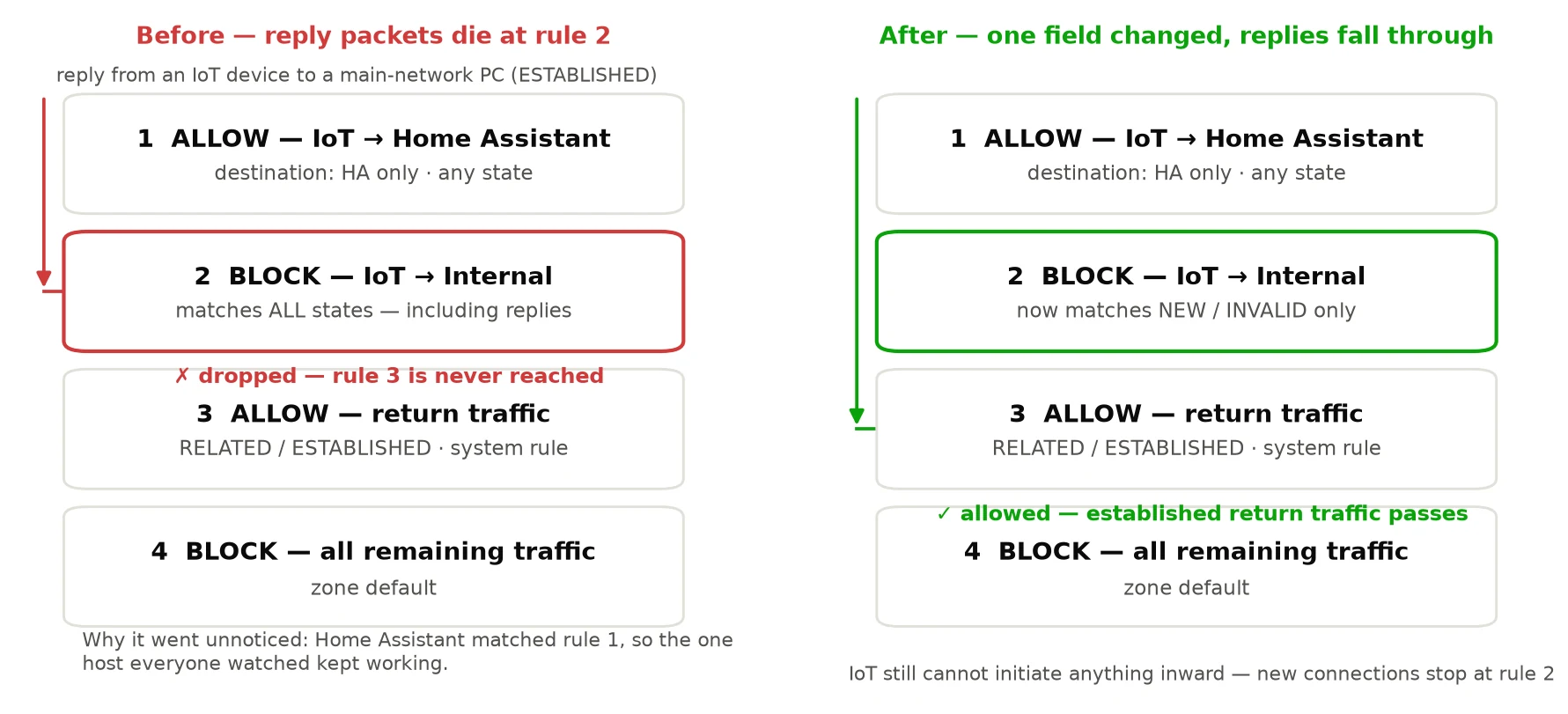
The fix was one field: scope the block to NEW and INVALID connections so established return traffic falls through to the return allow. IoT devices still can’t initiate anything toward the main network. If you run a zone-based firewall, this is the lesson worth stealing: a custom all-states block placed above the stateful return allow silently shadows return traffic for the whole zone pair. State-scope your blocks.
What the Pi confessed to (and what it didn’t)
With SSH restored, the Pi got a proper interrogation, and it produced one genuine surprise: nut-monitor — the NUT component that’s supposed to shut the Pi down cleanly when the battery runs low — had been dead at every boot. The config file was missing its MONITOR line entirely, so the daemon exited at startup, forever. The data pipeline worked; the shutdown chain behind it had never once been alive. One line fixed it.
The blackout forensics were more humbling. For the June gap the evidence is simply gone: the journal lives in RAM on this install and nothing writes logs to disk, so the box cannot testify about anything older than its memory. For the August gap the journal survives, and it exonerates the Pi: the NUT driver ran as the same PID through the whole window, WiFi never dropped, DHCP renewed on schedule, no USB events, no undervoltage ever (83 days of uptime, throttle flags all zero). The blackout happened somewhere between a perfectly healthy Pi and a perfectly healthy Home Assistant. The two surviving suspects: WiFi power save, which was enabled and is notorious on this chip for stalling inbound packets while keeping the association alive — now off — and hostname resolution, since HA was reaching the Pi by mDNS name and intermittently trying an IPv6 address that went nowhere. The integration is now pinned to a literal address. Neither is proven; both are eliminated.
What the power data actually says
Here’s the irony: nine months of monitoring recorded precisely zero events worth monitoring. The utility never sagged below 115 V, never rose above 126.6, and the frequency wandered between 59.8 and 60.0 Hz. The UPS never once transferred to battery. The only discharges in the whole record are its own scheduled self-tests.
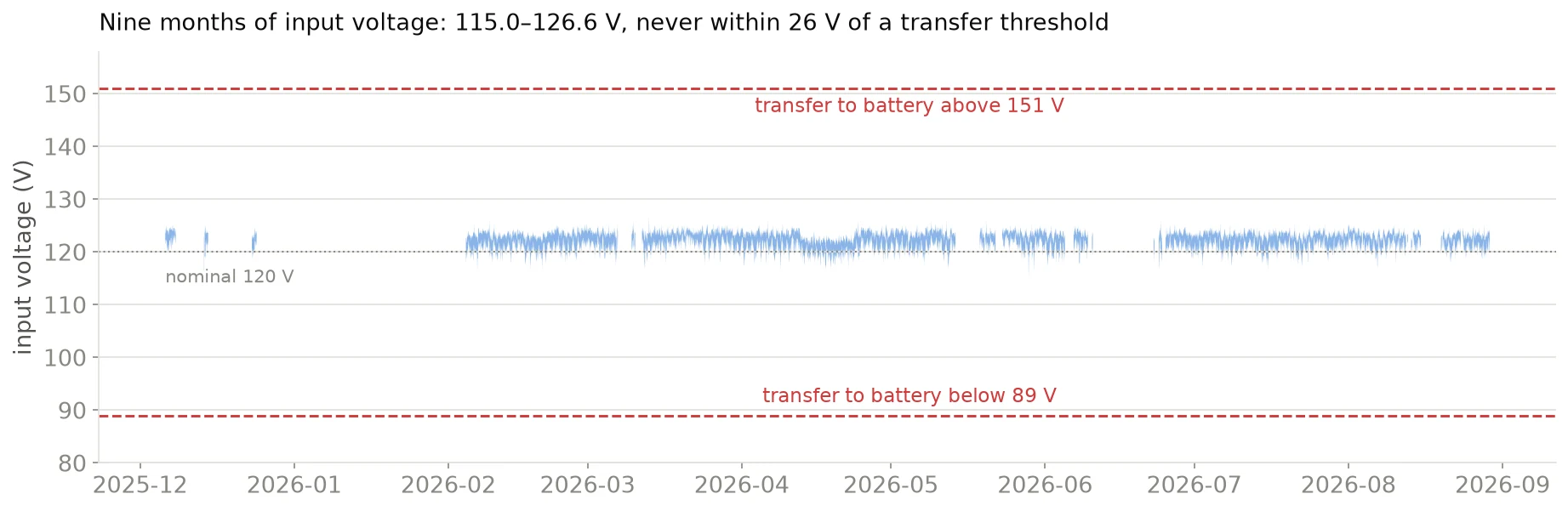
That’s not an argument against the UPS — it’s an argument about *where the risk lives*. On a clean grid, outages are rare, big, and unannounced, which means the battery only ever gets exercised by tests. So the tests are the health signal, and they deserve to be real: there’s now a quarterly deep test on the calendar (an actual discharge, not the monthly quick blip) with the result pushed to our phones.
The load story had a few surprises of its own:
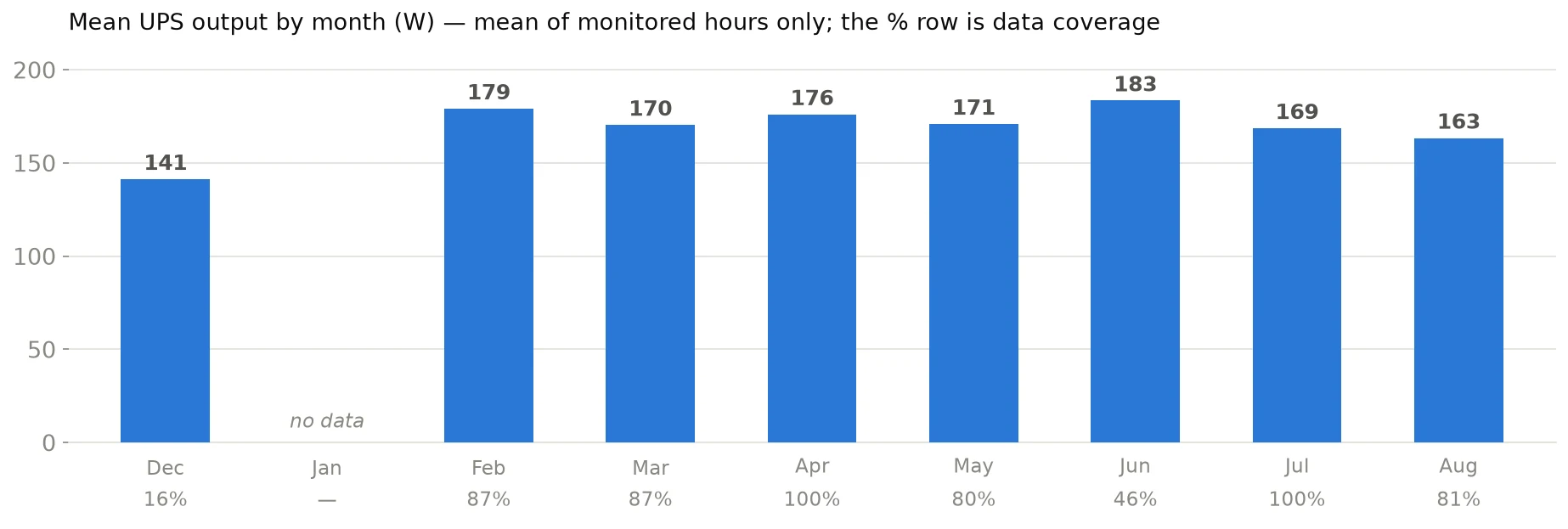
- The protected load averages 172 W — about 14% of what this UPS can deliver, with ~50 minutes of runtime. Comfortable.
- That’s 4.1 kWh a day through the UPS, call it $600 a year at California rates. The rack is now a tracked line in the Home Assistant energy dashboard, because a number you see monthly is a number you eventually reduce.
- Something permanent, about +50 W, arrived in January — during the winter blackout, so its arrival was never recorded. I still haven’t identified it. That’s ~$175 a year of mystery.
- One night in April the load spiked to 759 W — 69% of capacity — in the duty-cycled signature of a heated bed. The 3D printer had found its way onto a protected outlet. Nothing wrong with that at 69%, but a printer mid-print during an outage would cut the runtime for the network core from fifty minutes to ten.
- The battery-charge sensor is a liar. It reported 100% continuously, including through a full eight-hour charging cycle. If you alert on charge percentage you’ll find out about an outage very late — alert on status, which is where
OB(on battery) andLB(low battery) actually appear.
The fixes, in priority order
Everything below went in this week. The theme is not “more dashboards” — it’s making absence loud and outages procedural.
- A watchdog on the watchdog. If the UPS feed is unavailable for fifteen minutes, both phones hear about it, and again when it recovers. The six-week silent blackout can never happen again. This was the single highest-value change and it’s five lines of automation.
- An outage is now a plan, not a push notification. On battery + low battery, Home Assistant announces itself and shuts its own host down cleanly. The NAS joins the same NUT server as a network client so it can do the same. And the Pi’s own shutdown chain actually runs now (see: the missing
MONITORline). - The Pi got hardened. Every NUT service restarts automatically, the hardware watchdog reboots the box if the kernel wedges, WiFi power save is off, and the UPS itself no longer re-energises the load into an empty battery after an outage (restart now waits for 25% charge — the default was zero, which invites a second, unprotected dip).
- Trends over snapshots. Battery runtime at constant load is the best free indicator of battery aging, but the sensor shipped without long-term statistics. A one-line template sensor fixed that; in three years the graph will say more than any monthly “test passed” ever could.
What’s left is delightfully physical: walking the plugs to write down exactly what’s on which outlet group (so the UPS can shed non-critical load automatically and buy the network core another twenty minutes), and deciding whether the always-on conversion overhead — the UPS reports high-seventies efficiency at this low load, roughly $140 a year — justifies enabling its high-efficiency mode.
What I’d tell you to steal
If you run NUT, or any homelab monitoring at all: alert on absence, not just on events. Every alert in my setup keyed on something happening — a status change, a threshold crossed. Nothing keyed on the far more likely failure, which is the data simply stopping. One unavailable-for-15-minutes trigger would have been worth more than every chart I’d accumulated in nine months.
And check your shutdown chain end to end, once, for real. Mine had a firewall that dropped half its packets by state-matching accident, a shutdown daemon that had never successfully started, and a restart threshold of zero percent — three independent faults, all invisible, all behind a dashboard that looked great.
The dashboard was never the system. The dashboard was the anaesthetic.